This article picks up where the networking and storage setup left off. The Proxmox host (pve01.lab.example.com) is running with two VLAN-aware bridges, a ZFS mirror pool (vmpool), and shared ASM zvols already created. We now create all ten VMs using the qm CLI, configure shared storage for RAC, and verify each group before installing Oracle software.
1. VM Inventory and Resource Plan
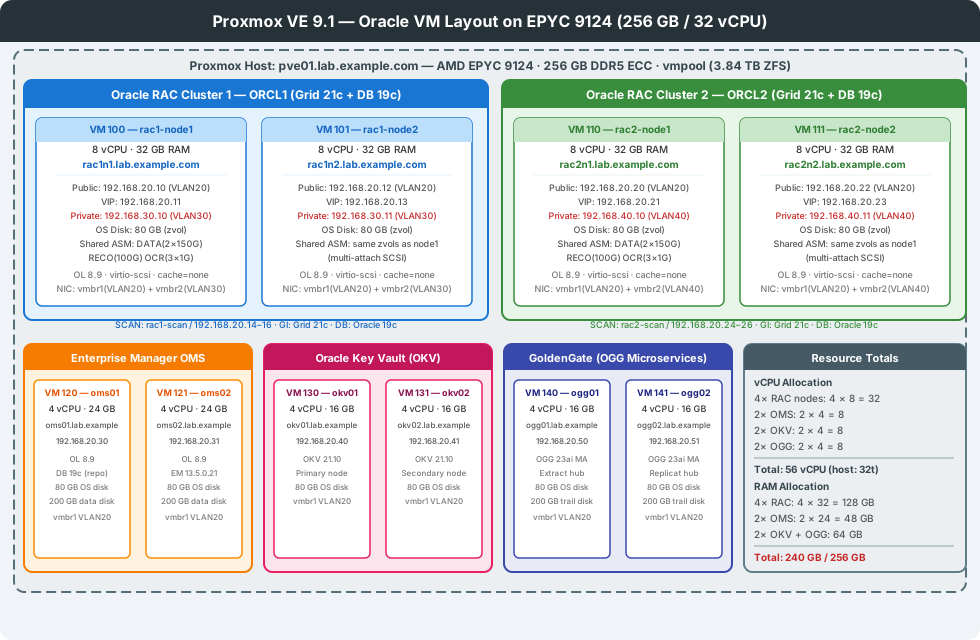
| VM ID | Hostname | Role | vCPU | RAM | OS Disk | Notes |
|---|---|---|---|---|---|---|
| 100 | rac1-node1 | RAC Cluster 1, Node 1 | 8 | 32 GB | 80 GB | Shared ASM |
| 101 | rac1-node2 | RAC Cluster 1, Node 2 | 8 | 32 GB | 80 GB | Shared ASM |
| 110 | rac2-node1 | RAC Cluster 2, Node 1 | 8 | 32 GB | 80 GB | Shared ASM |
| 111 | rac2-node2 | RAC Cluster 2, Node 2 | 8 | 32 GB | 80 GB | Shared ASM |
| 120 | oms01 | Enterprise Manager OMS 1 | 4 | 24 GB | 80 GB + 200 GB data | Primary OMS |
| 121 | oms02 | Enterprise Manager OMS 2 | 4 | 24 GB | 80 GB + 200 GB data | Secondary OMS |
| 130 | okv01 | Oracle Key Vault Primary | 4 | 16 GB | 80 GB | TDE key store |
| 131 | okv02 | Oracle Key Vault Secondary | 4 | 16 GB | 80 GB | Paired node |
| 140 | ogg01 | GoldenGate Microservices (Extract) | 4 | 16 GB | 80 GB + 200 GB trail | OGG 23ai MA |
| 141 | ogg02 | GoldenGate Microservices (Replicat) | 4 | 16 GB | 80 GB + 200 GB trail | OGG 23ai MA |
Total: 56 vCPU / 240 GB RAM — host has 32 threads and 256 GB. vCPU is intentionally overcommitted (lab workloads are not all active simultaneously). RAM headroom: 16 GB for Proxmox host.
2. IP Address Reference
| Host | Public (VLAN20) | VIP (VLAN20) | Private (VLAN30/40) |
|---|---|---|---|
| rac1-node1 | 192.168.20.10 | 192.168.20.11 | 192.168.30.10 |
| rac1-node2 | 192.168.20.12 | 192.168.20.13 | 192.168.30.11 |
| rac1-scan (×3) | 192.168.20.14–16 | — | — |
| rac2-node1 | 192.168.20.20 | 192.168.20.21 | 192.168.40.10 |
| rac2-node2 | 192.168.20.22 | 192.168.20.23 | 192.168.40.11 |
| rac2-scan (×3) | 192.168.20.24–26 | — | — |
| oms01 | 192.168.20.30 | — | — |
| oms02 | 192.168.20.31 | — | — |
| okv01 | 192.168.20.40 | — | — |
| okv02 | 192.168.20.41 | — | — |
| ogg01 | 192.168.20.50 | — | — |
| ogg02 | 192.168.20.51 | — | — |
Add all names to /etc/hosts on the Proxmox host for convenience, and ensure the guest /etc/hosts files match Oracle’s requirements (all public, VIP, SCAN, private names must resolve).
3. Base OS Template
Create one OL 8.9 template that all VMs clone from, saving time and ensuring consistency.
# Download Oracle Linux 8.9 minimal ISO to Proxmox
wget -O /var/lib/vz/template/iso/OracleLinux-R8-U9-x86_64-dvd.iso \
  https://yum.oracle.com/ISOS/OracleLinux/OL8/u9/x86_64/OracleLinux-R8-U9-x86_64-dvd.iso

# Create a VM that becomes the template (VM ID 9000)
qm create 9000 \
  --name "ol89-template" \
  --memory 4096 \
  --cores 2 \
  --cpu host \
  --numa 1 \
  --ostype l26 \
  --machine q35 \
  --bios seabios \
  --scsihw virtio-scsi-pci \
  --scsi0 vmpool-store:60,cache=writeback,discard=on,ssd=1 \
  --ide2 local:iso/OracleLinux-R8-U9-x86_64-dvd.iso,media=cdrom \
  --net0 virtio,bridge=vmbr1,tag=20 \
  --boot order=ide2 \
  --agent enabled=1 \
  --tablet 0

# Start and install OL8 minimal (via VNC/noVNC in Proxmox GUI)
qm start 9000
After OS install and before templating:
# Inside the VM — prepare for cloning
dnf update -y
dnf install -y qemu-guest-agent cloud-utils-growpart gdisk
systemctl enable --now qemu-guest-agent

# Oracle prerequisites
dnf install -y oracle-database-preinstall-19c
# Creates oracle user, oinstall/dba groups, sets kernel parameters

# Disable transparent hugepages (Oracle requirement)
grubby --update-kernel=ALL \
  --args="transparent_hugepage=never numa_balancing=disable"

# Disable firewalld and selinux in lab (re-enable in production)
systemctl disable --now firewalld
sed -i 's/^SELINUX=.*/SELINUX=permissive/' /etc/selinux/config

# Install qemu-guest-agent
systemctl enable --now qemu-guest-agent

# Clean and shutdown
dnf clean all
history -c
shutdown -h now
# Back on the Proxmox host — convert to template
qm template 9000
# Template is now read-only; all new VMs clone from it
4. Oracle RAC Cluster 1 (VMs 100 and 101)
4.1 Create Both Nodes by Cloning the Template
# Clone node 1
qm clone 9000 100 --name rac1-node1 --full true --storage vmpool-store
# Clone node 2
qm clone 9000 101 --name rac1-node2 --full true --storage vmpool-store
4.2 Resize OS Disk and Set Resources
for vmid in 100 101; do
  # Resize OS disk to 80 GB
  qm resize $vmid scsi0 80G

  # Set CPU and RAM
  qm set $vmid \
    --cores 8 \
    --memory 32768 \
    --hugepages 1024 \
    --cpu host \
    --numa 1

  # Public NIC on vmbr1 VLAN 20
  qm set $vmid --net0 virtio,bridge=vmbr1,tag=20,mtu=1500

  # Private interconnect NIC on vmbr2 VLAN 30 — MTU 9000 for Cache Fusion
  qm set $vmid --net1 virtio,bridge=vmbr2,tag=30,mtu=9000

  # Disable balloon driver (Oracle does not support memory ballooning)
  qm set $vmid --balloon 0

  # Auto-start on host boot
  qm set $vmid --onboot 1 --startup order=2,up=60
done
4.3 Attach Shared ASM Disks
The key requirement for Oracle RAC: both nodes must see the same block devices. In Proxmox, this is done by pointing two VMs at the same ZFS zvol.
# Each zvol device path on the host
ls /dev/zvol/vmpool/rac-shared/rac1-asm-*
# /dev/zvol/vmpool/rac-shared/rac1-asm-data1
# /dev/zvol/vmpool/rac-shared/rac1-asm-data2
# /dev/zvol/vmpool/rac-shared/rac1-asm-reco
# /dev/zvol/vmpool/rac-shared/rac1-asm-ocr1
# /dev/zvol/vmpool/rac-shared/rac1-asm-ocr2
# /dev/zvol/vmpool/rac-shared/rac1-asm-ocr3

# Attach to BOTH nodes — cache=none is MANDATORY for Oracle ASM
# scsi1–scsi6 map to ASM disks
for vmid in 100 101; do
  qm set $vmid --scsi1 /dev/zvol/vmpool/rac-shared/rac1-asm-data1,cache=none,aio=native,shared=1
  qm set $vmid --scsi2 /dev/zvol/vmpool/rac-shared/rac1-asm-data2,cache=none,aio=native,shared=1
  qm set $vmid --scsi3 /dev/zvol/vmpool/rac-shared/rac1-asm-reco,cache=none,aio=native,shared=1
  qm set $vmid --scsi4 /dev/zvol/vmpool/rac-shared/rac1-asm-ocr1,cache=none,aio=native,shared=1
  qm set $vmid --scsi5 /dev/zvol/vmpool/rac-shared/rac1-asm-ocr2,cache=none,aio=native,shared=1
  qm set $vmid --scsi6 /dev/zvol/vmpool/rac-shared/rac1-asm-ocr3,cache=none,aio=native,shared=1
done

# Verify VM 100 config
qm config 100 | grep scsi
Why
cache=noneandaio=native? Oracle ASM issues its own I/O fences and usesO_DIRECT. Any host-side write cache would corrupt ASM metadata on a crash.aio=nativeuses kernel AIO for direct I/O instead of thread-based emulation, reducing latency.
4.4 RAC Cluster 2 — Same Process, Different VLANs and Zvols
# Clone from template
qm clone 9000 110 --name rac2-node1 --full true --storage vmpool-store
qm clone 9000 111 --name rac2-node2 --full true --storage vmpool-store

for vmid in 110 111; do
  qm resize $vmid scsi0 80G
  qm set $vmid --cores 8 --memory 32768 --hugepages 1024 --cpu host --numa 1 --balloon 0
  qm set $vmid --net0 virtio,bridge=vmbr1,tag=20,mtu=1500
  # Private: VLAN 40 (separate from RAC1 on VLAN 30)
  qm set $vmid --net1 virtio,bridge=vmbr2,tag=40,mtu=9000
  qm set $vmid --onboot 1 --startup order=2,up=60
done

for vmid in 110 111; do
  qm set $vmid --scsi1 /dev/zvol/vmpool/rac-shared/rac2-asm-data1,cache=none,aio=native,shared=1
  qm set $vmid --scsi2 /dev/zvol/vmpool/rac-shared/rac2-asm-data2,cache=none,aio=native,shared=1
  qm set $vmid --scsi3 /dev/zvol/vmpool/rac-shared/rac2-asm-reco,cache=none,aio=native,shared=1
  qm set $vmid --scsi4 /dev/zvol/vmpool/rac-shared/rac2-asm-ocr1,cache=none,aio=native,shared=1
  qm set $vmid --scsi5 /dev/zvol/vmpool/rac-shared/rac2-asm-ocr2,cache=none,aio=native,shared=1
  qm set $vmid --scsi6 /dev/zvol/vmpool/rac-shared/rac2-asm-ocr3,cache=none,aio=native,shared=1
done
5. OMS VMs (Enterprise Manager) — VMs 120 and 121
for vmid in 120 121; do
  qm clone 9000 $vmid --name oms0$((vmid - 119)) --full true --storage vmpool-store
  qm resize $vmid scsi0 80G

  # Add 200 GB data disk for OMS software and repos
  qm set $vmid --scsi1 vmpool-store:200,cache=writeback

  qm set $vmid \
    --cores 4 \
    --memory 24576 \
    --cpu host \
    --numa 1 \
    --balloon 0 \
    --net0 virtio,bridge=vmbr1,tag=20 \
    --onboot 1 --startup order=3,up=120
done
OMS requires at least 16 GB RAM (24 GB recommended), a dedicated port 7802 (HTTPS), and access to all monitored targets via the public VLAN. The OMS repository database should be on the data disk (/u01/).
6. OKV VMs (Oracle Key Vault) — VMs 130 and 131
for vmid in 130 131; do
  idx=$((vmid - 129))
  qm clone 9000 $vmid --name okv0${idx} --full true --storage vmpool-store
  qm resize $vmid scsi0 80G

  qm set $vmid \
    --cores 4 \
    --memory 16384 \
    --cpu host \
    --numa 1 \
    --balloon 0 \
    --net0 virtio,bridge=vmbr1,tag=20 \
    --onboot 1 --startup order=1,up=30
done
OKV is installed as an appliance-style RPM (not a standard Oracle DB). It uses port 443 for HTTPS. Set startup order=1 so OKV is available before RAC nodes boot and attempt TDE wallet operations. The two OKV VMs are configured as a multi-master cluster — okv01 is the primary enrollment target; okv02 joins as a read-write peer.
7. GoldenGate VMs (OGG Microservices) — VMs 140 and 141
for vmid in 140 141; do
  idx=$((vmid - 139))
  qm clone 9000 $vmid --name ogg0${idx} --full true --storage vmpool-store
  qm resize $vmid scsi0 80G

  # 200 GB trail file disk (GoldenGate trail files can grow large)
  qm set $vmid --scsi1 vmpool-store:200,cache=writeback

  qm set $vmid \
    --cores 4 \
    --memory 16384 \
    --cpu host \
    --numa 1 \
    --balloon 0 \
    --net0 virtio,bridge=vmbr1,tag=20 \
    --onboot 1 --startup order=4,up=60
done
OGG Microservices Architecture uses a Service Manager (port 9011) fronting individual Extract and Replicat processes. ogg01 runs Extract against RAC Cluster 1; ogg02 runs Replicat targeting RAC Cluster 2 — simulating a full bidirectional replication lab.
8. Start All VMs and Verify
# Start in dependency order: OKV → RAC → OMS → OGG
for vmid in 130 131 100 101 110 111 120 121 140 141; do
  qm start $vmid
  sleep 5
done

# Verify all VMs are running
qm list
# VMID  NAME          STATUS   MEM(MB)  BOOTDISK(GB)  PID
# 100   rac1-node1    running  32768    80.00         ...
# 101   rac1-node2    running  32768    80.00         ...
# ...

# Check guest agent connectivity
for vmid in 100 101 110 111 120 121 130 131 140 141; do
  echo -n "VM $vmid: "
  qm guest cmd $vmid ping 2>/dev/null && echo "OK" || echo "no agent"
done
9. Guest Network Configuration (Inside Each VM)
After first boot, configure networking inside each VM. Using nmcli on OL 8.9:
# Example for rac1-node1 (VM 100)
# eth0 = public (VLAN20), eth1 = private (VLAN30)

# Public interface
nmcli con mod "Wired connection 1" \
  ipv4.method manual \
  ipv4.addresses "192.168.20.10/24" \
  ipv4.gateway "192.168.20.1" \
  ipv4.dns "192.168.20.1" \
  connection.id "eth0-public"
nmcli con up "eth0-public"

# Private interconnect (no gateway, no DNS — dedicated RAC interconnect)
nmcli con mod "Wired connection 2" \
  ipv4.method manual \
  ipv4.addresses "192.168.30.10/24" \
  ipv4.never-default yes \
  connection.id "eth1-private"
nmcli con up "eth1-private"

# Verify
ip addr show
ping -c 2 192.168.30.11   # Should reach rac1-node2 private IP
10. ASM Disk Visibility Check (Before Grid Install)
Before running the Grid Infrastructure installer, confirm all shared disks are visible in both nodes of each cluster:
# On rac1-node1 AND rac1-node2 — should see identical output
lsblk | grep -v loop
# sdb  150G  → rac1-asm-data1
# sdc  150G  → rac1-asm-data2
# sdd  100G  → rac1-asm-reco
# sde    1G  → rac1-asm-ocr1
# sdf    1G  → rac1-asm-ocr2
# sdg    1G  → rac1-asm-ocr3

# Label disks for ASM udev rules (run on BOTH nodes)
for i in b c d e f g; do
  dd if=/dev/zero of=/dev/sd${i} bs=4096 count=10 2>/dev/null
done

# Create udev rule for consistent ASM disk naming
cat > /etc/udev/rules.d/99-oracle-asm.rules << 'EOF'
KERNEL=="sdb", SYMLINK+="oracleasm/rac1-data1", OWNER="grid", GROUP="asmadmin", MODE="0660"
KERNEL=="sdc", SYMLINK+="oracleasm/rac1-data2", OWNER="grid", GROUP="asmadmin", MODE="0660"
KERNEL=="sdd", SYMLINK+="oracleasm/rac1-reco",  OWNER="grid", GROUP="asmadmin", MODE="0660"
KERNEL=="sde", SYMLINK+="oracleasm/rac1-ocr1",  OWNER="grid", GROUP="asmadmin", MODE="0660"
KERNEL=="sdf", SYMLINK+="oracleasm/rac1-ocr2",  OWNER="grid", GROUP="asmadmin", MODE="0660"
KERNEL=="sdg", SYMLINK+="oracleasm/rac1-ocr3",  OWNER="grid", GROUP="asmadmin", MODE="0660"
EOF
udevadm control --reload-rules && udevadm trigger
ls -la /dev/oracleasm/
11. Next Steps — Oracle Software Installation Order
With all VMs running and networking verified, the recommended software installation order is:
- OKV cluster (
okv01+okv02) — install OKV appliance, form multi-master cluster, create endpoints for each RAC cluster - Grid Infrastructure 21c on RAC Cluster 1 (
rac1-node1+rac1-node2) — configure OCR/voting on ASM, create DATA and RECO disk groups - Oracle DB 19c on RAC Cluster 1 — create CDB with TDE enabled, enroll with OKV
- Grid Infrastructure 21c on RAC Cluster 2 — same procedure
- Oracle DB 19c on RAC Cluster 2 — with TDE via OKV
- Enterprise Manager on
oms01— add both RAC clusters as targets; configureoms02as standby OMS - GoldenGate 23ai MA on
ogg01/ogg02— configure Extract on RAC1, Replicat on RAC2
This sequence ensures TDE keys are available before database creation, and that EM can discover fully-configured clusters rather than discovering them mid-build.