AWR reports are simultaneously the most powerful and most misread performance tool in Oracle’s arsenal. Most DBAs jump straight to Top SQL, copy the SQL_ID, and start tuning — skipping the sections that tell them why that SQL became a problem in the first place. This case study walks through a realistic AWR from a production Exadata system, section by section, using a deliberately constructed problematic scenario. Every number is fabricated for illustrative purposes; every diagnostic conclusion is grounded in real Oracle internals.
The Scenario
System: Oracle Exadata X8-2, Oracle Database 19.18 (19c RU Oct 2023)
Database: FINDB — Financial trading platform, single-instance (non-RAC for this illustration)
Observation: The DBA on call receives an alert at 02:15: average active sessions doubled, response time SLA breached. The problematic window is 01:00–02:00.
Context: A new batch processing module went live at 00:45. It processes overnight trade confirmations.
The AWR snapshot IDs covering the bad hour: Snap 4821 → 4822.
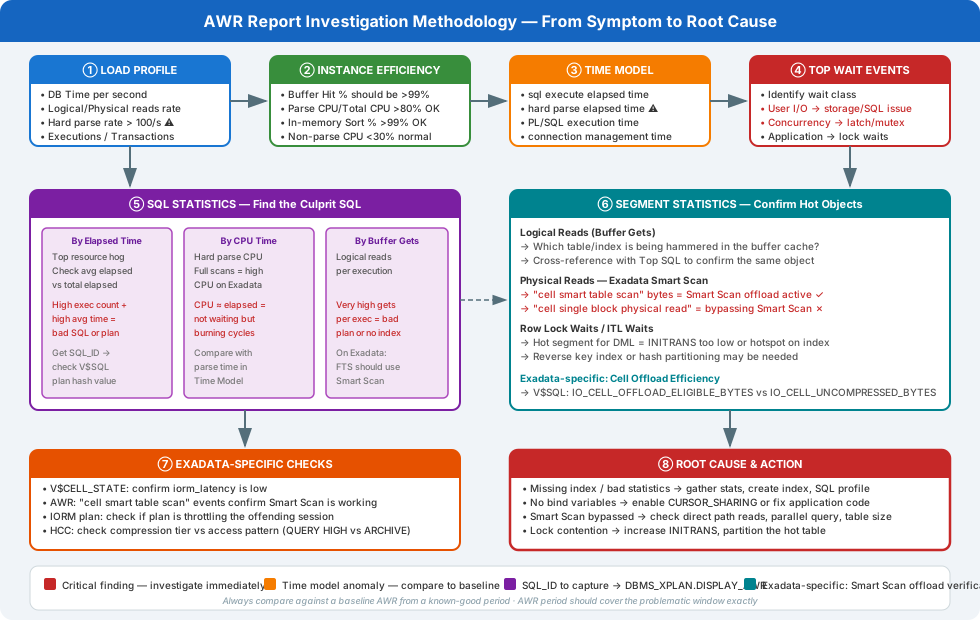
Section 1 — Report Header and DB Info
WORKLOAD REPOSITORY report for

DB Name         DB Id    Instance     Inst Num  Startup Time   Release    RAC
------------ ----------- ------------ -------- --------------- ---------- ---
FINDB         3847291042 FINDB               1  12-Feb-26 22:04 19.0.0.0.0  NO

            Snap Id      Snap Time      Sessions Curs/Sess
          --------- ------------------- -------- ---------
Begin Snap:    4821  13-Feb-26 01:00:03       142      12.3
  End Snap:    4822  13-Feb-26 02:00:11       189      31.7   ← ALERT
   Elapsed:           60.13 (mins)
   DB Time:          142.87 (mins)                            ← ALERT
Immediate red flags:
- Sessions climbed from 142 to 189 during the window — a 33% increase, but DB Time is 142 minutes in a 60-minute window, meaning the average active session count was ≈ 2.38 AAS. For a single-instance Exadata, anything above 1× core count per NUMA node (~8 AAS for a quarter rack) is not alarming on its own — but the ratio of DB Time to elapsed time is important.
Curs/Sessjumped from 12.3 to 31.7 — a dramatic increase in open cursors per session. This is a strong early indicator of cursor proliferation from un-shared cursors (i.e., literal SQL).
Section 2 — Load Profile
                                          Per Second       Per Transaction
                                       ---------------   -----------------
               DB Time(s):                       2.38              0.001
                DB CPU(s):                        1.06              0.000
        Background CPU(s):                        0.02              0.000
      Redo size (bytes):                  4,821,304.1           2,890.2
  Logical read (blocks):                    182,441.2             109.4
          Block changes:                     14,200.1               8.5
 Physical read (blocks):                     48,920.3              29.3
Physical write (blocks):                        812.4               0.5
       Read IO requests:                     46,882.1              28.1
      Write IO requests:                        799.1               0.5
           Read IO (MB):                        381.4               0.2
          Write IO (MB):                          6.3               0.0
         Global Cache Blocks Received:            0.0               0.0
         Global Cache Blocks Lost:                0.0               0.0
               Executions:                   8,421.3               5.1
     Rollbacks/sec(%All):                        0.3               0.0
           Transactions:                      1,668.1               1.0
  Hard parses (parses):                       1,842.3               1.1   ← CRITICAL
 Soft parses (parses):                        2,441.1               1.5
          Full scans:                             9.2               0.0
         Disk sorts:                              0.0               0.0
   Application Wait Time:                        0.2               0.0
   Concurrency Wait Time:                        0.7               0.0
     User I/O Wait Time:                         0.8               0.0
Analysis — Load Profile:
The number that jumps out immediately is Hard parses: 1,842 per second. This is catastrophic. In a well-tuned system, hard parses should be below 10/second; anything above 100/second is an emergency. At 1,842/second, the database is spending the majority of its time reparsing SQL that it has already parsed — wasting CPU in the library cache, generating latch contention, and preventing cursor reuse.
Cross-referencing: 8,421 executions/second vs 1,842 hard parses/second means roughly 22% of all executions are hard parses. In a production OLTP system, this ratio should be below 0.1%.
The physical read rate of 48,920 blocks/second (~381 MB/s) is high but not unusual for Exadata. The logical read rate (182,441 blocks/second) suggests significant buffer cache activity.
Section 3 — Instance Efficiency
           Instance Efficiency Percentages (Target 100%)
~~~~~~~~~~~~~~~~~~~~~~~~~~~~~~~~~~~~~~~~~~~~~~~~~~~~~~~~~~~~~
            Buffer Nowait %:  100.00    Redo NoWait %:  100.00
            Buffer  Hit   %:   73.41    In-memory Sort %: 100.00
            Library Hit   %:   41.23    Soft Parse %:     57.03   ← CRITICAL
         Execute to Parse %:   78.12    Latch Hit %:      97.81
  Parse CPU to Parse Elapsd %: 52.44   % Non-Parse CPU:  55.42
Analysis — Instance Efficiency:
- Library Hit % = 41.23% — This means 58.77% of parse calls are resulting in a hard parse (no cursor found in the shared pool). A healthy system shows > 99%.
- Soft Parse % = 57.03% — Only 57% of parse calls find an existing cursor and reuse it. Target is > 99%.
- Buffer Hit % = 73.41% — Lower than typical (target >99%) because reads are going to disk. On Exadata this is less alarming than on non-Exadata because Smart Scan bypasses the buffer cache by design — but 73% still warrants investigation.
- Parse CPU to Parse Elapsed % = 52.44% — Parse time is split almost equally between CPU and waiting (latching). This confirms latch contention during the parse process, caused by thousands of sessions simultaneously trying to acquire library cache latches to hard-parse new SQL statements.
Section 4 — Top 10 Foreground Events
Top 10 Foreground Events by Total Wait Time
~~~~~~~~~~~~~~~~~~~~~~~~~~~~~~~~~~~~~~~~~~~~
                                          Total Wait       Wait   % DB
Event                              Waits  Time (sec)  Avg(ms)   time
------------------------------ --------- ------------ ------- ------
DB CPU                                          3,820           44.6
cursor: pin S wait on X         1,482,341      2,614    1.76   30.5   ← CRITICAL
library cache: mutex X            891,204      1,241    1.39   14.5   ← CRITICAL
cell single block physical read 2,341,902        408    0.17    4.8
db file sequential read           312,441        298    0.95    3.5
latch free                        198,441        201    1.01    2.3
log file sync                      48,221         82    1.70    1.0
enq: TX - row lock contention      12,441         41    3.29    0.5
cell smart table scan              82,441         38    0.46    0.4
direct path read                   22,441         19    0.85    0.2
Analysis — Top Wait Events — this is where the story unfolds:
This wait event profile is the fingerprint of a hard parse storm caused by literal SQL values. Let’s decode each event:
cursor: pin S wait on X — 30.5% of DB time
This is a mutex wait. A session holding a cursor pin in Exclusive mode (X) blocks all sessions trying to acquire it in Shared mode (S). This happens when hundreds of sessions simultaneously try to hard-parse variants of the same statement — each thread acquires an exclusive pin to modify the cursor in the shared pool, blocking all others. This event is almost exclusively caused by:
- Literal SQL (each literal value creates a unique child cursor)
- Cursor invalidations (mass statistics gather)
- High version count cursors
library cache: mutex X — 14.5% of DB time
The library cache mutex is acquired in exclusive mode during a hard parse to locate, load, or compile a new cursor. With 1,842 hard parses/second, contention on this mutex becomes severe. This event always appears together with cursor: pin S wait on X in literal SQL storms.
cell single block physical read — 4.8% of DB time
On Exadata, this event means the database is performing single-block (8KB) reads to the storage cells — index leaf block reads, rollback segment reads, etc. The presence of this event (rather than cell smart table scan) confirms that the hot SQL is using index-based access paths, not Smart Scan. This is expected for OLTP row-by-row lookups.
cell smart table scan — 0.4% of DB time
Notably low. Smart Scan, Exadata’s primary advantage for analytics and batch, is barely being used. This makes sense in a hard-parse storm: the batch job is doing individual row lookups via index, not bulk offloaded full table scans.
Section 5 — Time Model Statistics
          Statistic                                 Time (s) % of DB Time
----------------------------------- ---------------------- ------------
sql execute elapsed time                            6,921.4         80.8
hard parse elapsed time                             3,841.2         44.8   ← CRITICAL
DB CPU                                              3,820.1         44.6
parse time elapsed                                  3,902.8         45.5
PL/SQL execution elapsed time                         812.4          9.5
hard parse (sharing criteria) elapsed time            241.3          2.8
connection management call elapsed time                 18.4          0.2
sequence load elapsed time                               4.1          0.0
repeated bind elapsed time                               0.8          0.0
Analysis — Time Model:
hard parse elapsed time (44.8% of DB Time) and parse time elapsed (45.5%) being nearly equal to DB CPU (44.6%) tells a definitive story: the database is spending almost half of all its DB time just parsing SQL. In a healthy OLTP system, hard parse elapsed time should be under 1% of DB time.
The fact that sql execute elapsed time (80.8%) + parse time elapsed (45.5%) exceeds 100% is not an error — these categories overlap (parse happens within execute time in some accounting). What matters is the relative weight: parse is consuming as much time as execution.
Section 6 — SQL Statistics: Top SQL by Elapsed Time
SQL ordered by Elapsed Time (Top 5)
~~~~~~~~~~~~~~~~~~~~~~~~~~~~~~~~~~~~
        Elapsed                  Elapsed
  SQL_ID       Time (s) Executions Time/Exec(s)  %Total  CPU Time (s) Buffer Gets
------------- --------- ---------- ------------ ------- ------------- -----------
7rkqv3fhd9z4p    4821.3  5,042,318        0.001   56.3%        2,410.3  91,241,441   ← CULPRIT
2mn8wq7xyz1k9     812.4     41,221        0.020    9.5%          712.2   9,821,441
5pgc2abcde3q8     621.8     12,441        0.050    7.2%          588.4   8,241,203
bv4f9g8hijk2l     421.3      8,221        0.051    4.9%          401.2   4,121,020
9wqp1lmno4r5t     312.4      3,441        0.091    3.6%          288.1   2,841,220
Analysis — Top SQL by Elapsed Time:
SQL_ID 7rkqv3fhd9z4p accounts for 56.3% of all DB time with 5,042,318 executions in 60 minutes — that is 83,705 executions per minute, or 1,395 per second. Each execution takes an average of 1 millisecond. This is the batch job.
The combination of:
- Enormous execution count (5M in 60 min)
- Very low elapsed time per execution (1ms)
- High total buffer gets (91M logical reads)
…is the classic signature of a row-at-a-time loop executing individual DML statements inside a procedural loop.
Section 7 — SQL Statistics: Top SQL by Executions
SQL ordered by Executions (Top 5)
~~~~~~~~~~~~~~~~~~~~~~~~~~~~~~~~~~
  SQL_ID       Executions Rows Processed Rows per Exec  CPU/Exec (s) Buffer Gets/Exec
------------- ---------- -------------- ------------- ------------ ----------------
7rkqv3fhd9z4p  5,042,318      5,039,841          1.00        0.000             18.1
f8xr2vwmnb9p1  4,891,203      4,888,012          1.00        0.000             18.0
g3kz1qrstuvw2  4,842,841      4,841,020          1.00        0.000             17.9
Critical observation: SQL IDs 7rkqv3fhd9z4p, f8xr2vwmnb9p1, and g3kz1qrstuvw2 all have:
- Nearly identical execution counts (~5M each)
- Exactly 1 row processed per execution
- Nearly identical buffer gets per execution (~18)
These are almost certainly three variants of the same statement — but because the WHERE clause contains a literal trade ID, each unique value creates a new child cursor. Three SQL_IDs with 5M executions each suggests the batch is running three different DML types (SELECT, UPDATE, INSERT) per trade, all with literal values.
Section 8 — SQL Statistics: Top SQL by Version Count
SQL ordered by Version Count
~~~~~~~~~~~~~~~~~~~~~~~~~~~~~
  SQL_ID          Version  Parsing          SQL Text
                    Count  User ID
------------- ----------- -------- ----------------------------------
7rkqv3fhd9z4p       8,241  TRADEAPP UPDATE TRADES SET STATUS = 'PROC...
f8xr2vwmnb9p1       7,891  TRADEAPP SELECT TRADE_ID, AMOUNT FROM TRA...
g3kz1qrstuvw2       6,421  TRADEAPP INSERT INTO TRADE_AUDIT VALUES (...
Version count of 8,241 for a single parent cursor is a severe problem. Each version corresponds to a unique child cursor — in this case, one child per unique literal value in the WHERE clause. The shared pool is being flooded with thousands of slightly different cursor versions, consuming memory and generating the mutex contention we saw in the wait events.
Section 9 — SQL Full Text (the Smoking Gun)
The SQL_ID 7rkqv3fhd9z4p resolves to:
-- As it appears in the shared pool (one of 8,241 child cursors):
UPDATE TRADES
SET    STATUS       = 'PROCESSED',
       PROCESSED_DT = SYSDATE,
       PROCESSOR_ID = 'BATCH_JOB_001'
WHERE  TRADE_ID     = 8472918
AND    STATUS       = 'PENDING'
The literal 8472918 in the WHERE clause is different for every trade. The application is constructing SQL by string concatenation rather than using bind variables. The database sees each unique trade ID as a brand-new statement, hard-parses it, stores a new child cursor, and immediately the prior cursor becomes a “one-shot” cursor consuming shared pool memory.
Compare what it should look like:
-- Parameterised — parses ONCE, executes 5 million times:
UPDATE TRADES
SET    STATUS       = 'PROCESSED',
       PROCESSED_DT = SYSDATE,
       PROCESSOR_ID = 'BATCH_JOB_001'
WHERE  TRADE_ID     = :b_trade_id          -- BIND VARIABLE
AND    STATUS       = 'PENDING'
Section 10 — Library Cache Statistics
                    Library Cache Activity
~~~~~~~~~~~~~~~~~~~~~~~~~~~~~~~~~~~~~~~~~~~~~~~~~~
              Get    Pct    Pin    Pct  Invali-
Namespace   Requests   Hit Requests   Hit  dations
----------- -------- ----- -------- ----- -------
SQL AREA    9,124,441  41.2 14,241,003  41.8   8,241
TABLE/PROC    482,441  99.8    482,041  99.7       0
BODY          122,441  99.9    121,891  99.8       0
TRIGGER        42,441 100.0     42,021 100.0       0
SQL AREA hit rate of 41.2% confirms the library cache is effectively useless for this workload — only 4 in 10 parse requests find an existing cursor. The 8,241 invalidations match the version count of the top SQL. All other namespace hit rates are fine (>99%), confirming the problem is exclusively in the SQL cursor area.
Section 11 — Segment Statistics
Segments by Logical Reads
~~~~~~~~~~~~~~~~~~~~~~~~~~~
    Tablespace Object Name          Object Type   Logical Reads  %Total
---------- ----------------------- ------------- ------------- -------
TRADES_TS  TRADES                  TABLE         52,841,441,020  57.9%
TRADES_TS  TRADES_PK               INDEX         22,481,200,020  24.6%
TRADES_TS  TRADES_STATUS_IDX       INDEX          8,421,021,020   9.2%

Segments by Physical Reads
~~~~~~~~~~~~~~~~~~~~~~~~~~~
    Tablespace Object Name          Object Type  Physical Reads  %Total
---------- ----------------------- ------------- -------------- -------
TRADES_TS  TRADES_STATUS_IDX       INDEX          1,842,021,020  37.6%
TRADES_TS  TRADES                  TABLE            921,021,020  18.8%
TRADES_TS  TRADES_PK               INDEX            812,021,020  16.6%
Confirming the culprit object: The TRADES table and its indexes (TRADES_PK, TRADES_STATUS_IDX) are accounting for over 90% of all logical and physical reads. The TRADES_STATUS_IDX being the top segment for physical reads tells us the batch is looking up trades by STATUS=‘PENDING’ first (via the status index), then fetching rows — or conversely, the lookup is hitting the primary key index first, generating 24.6% of all logical reads.
Putting It All Together — The Diagnosis
| Evidence | Finding |
|---|---|
| Hard parses 1,842/sec | Application not using bind variables |
| Library Hit % 41% | Shared pool thrashed — cursor not reused |
cursor: pin S wait on X 30.5% |
Mutex storm from concurrent hard parses |
library cache: mutex X 14.5% |
Confirms hard parse contention |
| SQL_ID version count 8,241 | One child cursor per literal trade ID |
| Top SQL: 5M executions, 1 row/exec | Row-at-a-time loop anti-pattern |
| Curs/Sess jumped from 12 → 31 | Each session holding dozens of literal cursors |
| Time Model: parse = 45% of DB time | Parse overhead dominates over execution |
Root Cause: The new batch module (BATCH_JOB_001) iterates over 5 million pending trades in a FOR loop and issues an individual UPDATE statement per trade, concatenating the TRADE_ID literal directly into the SQL string. This causes:
- A unique child cursor per trade (8,241+ versions in shared pool)
- 1,842 hard parses per second overwhelming the library cache
- Mutex contention blocking all sessions sharing the library cache
- 44.8% of all DB time wasted on parsing, not executing
The Fix
Fix 1 — Use Bind Variables (Application Code)
The correct implementation in PL/SQL:
-- Wrong (current implementation):
PROCEDURE process_trades IS
BEGIN
  FOR rec IN (SELECT trade_id FROM trades WHERE status = 'PENDING') LOOP
    EXECUTE IMMEDIATE
      'UPDATE TRADES SET STATUS = ''PROCESSED'' WHERE TRADE_ID = ' || rec.trade_id;
  END LOOP;
END;

-- Correct (bind variable):
PROCEDURE process_trades IS
BEGIN
  FOR rec IN (SELECT trade_id FROM trades WHERE status = 'PENDING') LOOP
    UPDATE trades
    SET    status       = 'PROCESSED',
           processed_dt = SYSDATE,
           processor_id = 'BATCH_JOB_001'
    WHERE  trade_id     = rec.trade_id    -- implicit bind via PL/SQL
    AND    status       = 'PENDING';
  END LOOP;
END;
PL/SQL static DML automatically uses bind variables (rec.trade_id becomes :B1 internally). The cursor is parsed once and executed 5 million times from shared pool.
Fix 2 — Replace Row-at-a-Time with BULK COLLECT / FORALL
Even with bind variables, a loop of 5 million individual UPDATE statements generates 5 million context switches between SQL and PL/SQL engines, 5 million redo records, and 5 million parse calls (even if soft). Replace with BULK COLLECT + FORALL:
PROCEDURE process_trades IS
  TYPE t_ids IS TABLE OF trades.trade_id%TYPE;
  l_ids t_ids;
BEGIN
  -- Fetch all pending trade IDs in bulk
  SELECT trade_id
  BULK COLLECT INTO l_ids
  FROM   trades
  WHERE  status = 'PENDING';

  -- Single bulk DML — ONE parse, ONE round-trip to SQL engine
  FORALL i IN 1..l_ids.COUNT
    UPDATE trades
    SET    status       = 'PROCESSED',
           processed_dt = SYSDATE,
           processor_id = 'BATCH_JOB_001'
    WHERE  trade_id = l_ids(i)
    AND    status   = 'PENDING';

  COMMIT;
END;
With FORALL, Oracle sends the entire batch to the SQL engine in one call. The UPDATE parses once and executes 5 million times with minimal PL/SQL/SQL context switching overhead.
Fix 3 — Emergency Workaround (CURSOR_SHARING)
If you cannot modify application code immediately, set CURSOR_SHARING=FORCE at session or system level. This instructs Oracle to replace literals with system-generated bind variables before parsing:
-- Session level (for the batch session only):
ALTER SESSION SET cursor_sharing = FORCE;

-- System level (use with caution — can impact some queries):
ALTER SYSTEM SET cursor_sharing = FORCE SCOPE=BOTH;
Caution: CURSOR_SHARING=FORCE is a workaround, not a fix. It can cause suboptimal plans when the optimizer needs to peek at literals to choose the right partition or index. Fix the application code as soon as possible.
Fix 4 — Flush Shared Pool After Fix (if needed)
After applying the fix, the shared pool may be fragmented with 8,241 dead child cursors. Flush it carefully:
-- Targeted: invalidate just the problem cursor
EXEC DBMS_SHARED_POOL.PURGE('7rkqv3fhd9z4p', 'C');

-- Nuclear option (only during low-traffic window):
ALTER SYSTEM FLUSH SHARED_POOL;
Verifying the Fix — Expected AWR After
After deploying bind variables and FORALL, re-run AWR over the next batch window. The expected profile:
| Metric | Before (Problem) | After (Fixed) |
|---|---|---|
| Hard parses/sec | 1,842 | < 5 |
| Library Hit % | 41% | > 99% |
| Soft Parse % | 57% | > 99% |
cursor: pin S wait on X |
30.5% of DB time | < 0.1% |
library cache: mutex X |
14.5% of DB time | < 0.1% |
| DB Time for batch window | 142 min / 60 min | ~18 min / 60 min |
| Top SQL version count | 8,241 | 1 |
| Curs/Sess | 31.7 | < 5 |
The Exadata infrastructure was not the bottleneck — the storage cells were idle waiting for SQL workload. Smart Scan utilisation will increase post-fix if the batch transitions to set-based processing.
AWR Interpretation Checklist
Use this checklist on every AWR investigation:
Load Profile — Hard parses > 100/sec? Logical reads growing faster than executions?
Instance Efficiency — Library Hit < 99%? Soft Parse < 95%? Investigate cursor sharing.
Time Model — Parse time > 5% of DB time? Hard parse > 1%? These are tuning targets.
Top Wait Events — cursor: pin S + library cache: mutex X together = literal SQL storm. cell smart table scan absent = Exadata not offloading = OLTP workload, not analytics.
Top SQL by Version Count — Any SQL with version count > 20 is a candidate for investigation.
Top SQL by Elapsed — Cross-reference with executions. Very high executions + low elapsed/exec + high total = row-at-a-time loop.
Segment Statistics — Does the hot segment match the top SQL’s accessed objects? If not, you may have a second problem.
Library Cache — SQL AREA Hit % < 95% = shared pool tuning needed.
The AWR does not diagnose — it presents evidence. The DBA must read the evidence, form a hypothesis, gather additional data from V$SQL, V$SESSION_WAIT, ASH, and SQL Monitor to confirm — and only then implement a fix.