Switchover and failover are the two role-transition operations in Oracle Data Guard. Switchover is a planned, graceful transition (both databases remain available throughout). Failover is an emergency response to primary failure. Having a tested, documented playbook for both is a MAA operational requirement — discovering the procedure on the night of a failure is not a plan.
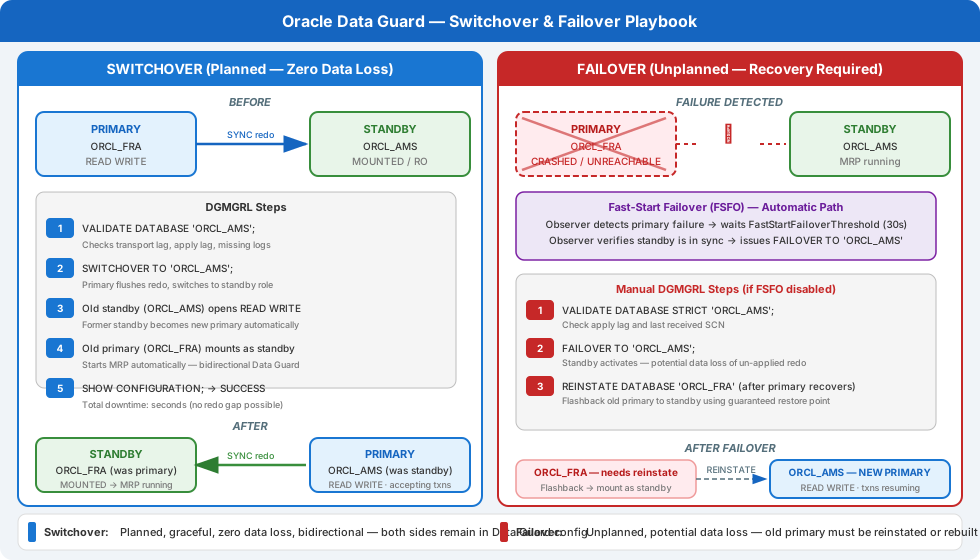
Terminology Recap
| Term | Trigger | Data Loss? | Primary State Afterward |
|---|---|---|---|
| Switchover | Planned maintenance | None | Becomes standby (online) |
| Failover | Primary failure | Possible (ASYNC) or None (SYNC) | Unavailable (failed) |
| Reinstate | After failover | N/A | Failed primary becomes new standby |
Always use the Data Guard Broker (DGMGRL) for role transitions. Direct SQL*Plus procedures are error-prone and lack the consistency checks the Broker provides.
Pre-Operation Validation
Run these checks before any role transition:
-- On primary: verify standby is synchronised
SELECT name, value, datum_time
FROM v$dataguard_stats
WHERE name IN ('transport lag', 'apply lag');
NAME             VALUE        DATUM_TIME
---------------- ------------ -------------------
transport lag    +00 00:00:00 03/01/2026 14:22:10
apply lag        +00 00:00:00 03/01/2026 14:22:08
Both lags should be zero (or near-zero for ASYNC) before proceeding.
# Via DGMGRL: validate the standby configuration
dgmgrl sys/Password1@primary_db

DGMGRL> SHOW CONFIGURATION;

Configuration - prod_dg
  Protection Mode: MaxAvailability
  Members:
  primary_db  - Primary database
    standby_db - Physical standby database

Fast-Start Failover:  Enabled

Configuration Status:
SUCCESS   (status updated 12 seconds ago)
DGMGRL> VALIDATE DATABASE standby_db;
The VALIDATE DATABASE command checks redo transport, apply services, and standby file structure. Address any WARNING or ERROR output before proceeding.
Planned Switchover Procedure
Switchover Using DGMGRL
dgmgrl sys/Password1@primary_db

# Verify before switchover
DGMGRL> SHOW DATABASE VERBOSE standby_db;

# Execute switchover
DGMGRL> SWITCHOVER TO standby_db;
Performing switchover NOW, please wait...
Operation requires a connection to database "standby_db"
Connecting to database "standby_db"...
Connected to "standby_db"
Connected as SYSDBA.
Succeeded in opening database "standby_db".
Completed switchover of "standby_db", new primary.

# Verify new roles
DGMGRL> SHOW CONFIGURATION;

Configuration - prod_dg
  Protection Mode: MaxAvailability
  Members:
  standby_db  - Primary database    ← New primary
    primary_db - Physical standby database ← Now standby
What Happens Internally During Switchover
- Primary flushes all unsent redo to the standby.
- Primary waits for all redo to be applied on the standby (zero lag).
- Primary transitions to standby role — it starts redo transport from the new primary.
- Standby transitions to primary role — it opens read-write.
- Applications reconnect (via SCAN/service, FSFO, or TAF) to the new primary.
Application Connection Redirect
After switchover, applications connecting via a service name will automatically be redirected if Fast-Start Failover is configured or if the service is database-role-dependent:
# Services configured with role=PRIMARY automatically start on the new primary
srvctl status service -d STANDBY_DB
Emergency Failover Procedure
Failover is performed when the primary is unavailable and cannot be recovered in an acceptable timeframe. It is irreversible without a reinstate operation.
Decision Gate: Failover or Wait?
Before failing over:
- Confirm the primary is genuinely unreachable — not just a network partition.
- Confirm you understand the data loss exposure (check last transport lag from AWR or the standby’s last applied SCN).
- Confirm this is authorised — an accidental failover of a healthy primary creates a split-brain scenario.
-- On standby: check last received and applied SCN
SELECT thread#, sequence#, first_change#, last_change#, applied
FROM v$archived_log
WHERE standby_dest = 'YES'
ORDER BY thread#, sequence# DESC
FETCH FIRST 10 ROWS ONLY;
Failover Using DGMGRL
dgmgrl sys/Password1@standby_db

DGMGRL> FAILOVER TO standby_db;
Performing failover NOW, please wait...
Failover succeeded, new primary is "standby_db"
Failover with Potential Data Loss (ASYNC only)
If the primary was in ASYNC mode and there is a redo gap (the standby never received some redo), DGMGRL will warn:
Warning: Possible data loss!
Last redo received by "standby_db" is not current.
To proceed with failover accepting potential data loss:
DGMGRL> FAILOVER TO standby_db IMMEDIATE;
Review the Flashback Logs or Redo Gap after failover to understand exactly what data was lost.
Post-Failover: Reinstating the Old Primary
After failover, the old primary is in an unknown/failed state. Once it is recoverable, reinstate it as the new standby (rather than rebuilding from scratch):
# Start the old primary in MOUNT mode
startup mount;

# From DGMGRL: reinstate the old primary as a standby
dgmgrl sys/Password1@standby_db   # connect to the new primary

DGMGRL> REINSTATE DATABASE primary_db;
Reinstating database "primary_db", please wait...
Reinstatement of database "primary_db" succeeded
After reinstatement, the old primary is a physical standby, receiving redo from the new primary.
Fast-Start Failover (Automatic)
With FSFO configured and the observer running, failover is fully automatic when the primary is unreachable for more than FastStartFailoverThreshold seconds (default: 30):
DGMGRL> SHOW FAST_START FAILOVER;

Fast-Start Failover:  Enabled
  Threshold:          30 seconds
  Target:             standby_db
  Observer:           observer-host.domain.com
  Lag Limit:          30 seconds
  Shutdown Primary:   TRUE
  Auto-reinstate:     TRUE
Auto-reinstate: TRUE means the failed primary is automatically reinstated as a standby when it recovers — no DBA action required. This is the correct configuration for fully automated MAA Gold environments.
Post-Switchover/Failover Checklist
# 1. Verify new primary is open READ WRITE
SELECT open_mode, database_role FROM v$database;

# 2. Verify redo transport to new standby is active
SELECT dest_id, status, destination, target
FROM v$archive_dest
WHERE dest_id = 2;

# 3. Verify new standby is applying redo
SELECT process, status, sequence#
FROM v$managed_standby;

# 4. Restart application connections and verify connectivity
# Test the service from application tier

# 5. Verify FSFO observer is monitoring new configuration
DGMGRL> SHOW FAST_START FAILOVER;

# 6. Generate a new AWR snapshot to mark the role change
EXEC DBMS_WORKLOAD_REPOSITORY.CREATE_SNAPSHOT();
Common Failover Mistakes
- Failing over without confirming primary is down: creates split-brain if primary recovers and both think they are primary.
- Not redirecting applications: applications continue trying to reach the failed primary.
- Forgetting to reinstate the old primary: the configuration has no standby after failover until reinstate completes.
- Not testing the procedure: the first time you execute a failover should not be during an incident. Schedule quarterly DR drills.
- FSFO observer not running: FSFO is configured but inactive if the observer process is not running. Verify observer status weekly via
DGMGRL> SHOW FAST_START FAILOVER.