The redo transport configuration is the most consequential architectural decision in a Data Guard deployment. It determines the data loss exposure (RPO), the performance overhead on the primary, and the recovery point after a failover. Choosing SYNC or ASYNC without understanding the mechanics leads to either unacceptable data loss or unnecessary primary database degradation.
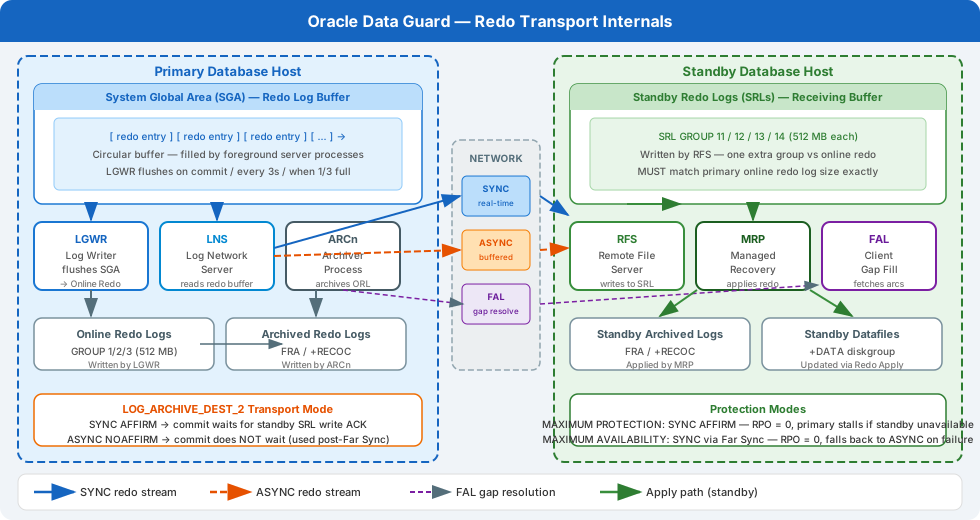
Redo Transport Mechanisms
ASYNC Transport (ARCN-based)
In ASYNC mode, the primary database commits without waiting for the standby to acknowledge receipt of redo. The ARCn background process archives completed log groups and ships them to the standby.
- When data is at risk: Between the last archived log shipped and the current online redo log. In the worst case — a failure right before a log switch — you lose all uncommitted and committed-but-not-archived transactions.
- Primary overhead: Minimal.
ARCnis asynchronous and does not sit in the commit path. - Suitable for: Cross-region DR where network latency makes SYNC impractical; RPO of minutes is acceptable.
SYNC Transport (LGWR-based)
In SYNC mode, the primary’s LGWR (Log Writer) sends redo to the standby and waits for acknowledgement before the commit can return to the application. The transaction is not complete until the redo is durable (or at least acknowledged) on the standby.
- When data is at risk: Never, under
MAXIMUM_AVAILABILITYorMAXIMUM_PROTECTION— committed transactions are guaranteed to be on the standby before the commit returns. - Primary overhead: Every commit incurs a round-trip to the standby over the network. With intra-data-centre latency of < 1ms, this overhead is typically < 1–2% on well-designed OLTP workloads.
- Suitable for: Production systems requiring zero data loss within a data centre or campus network.
Protection Modes
Data Guard protection modes govern the interaction between transport and commit behaviour:
-- Check current protection mode
SELECT protection_mode, protection_level FROM v$database;
PROTECTION_MODE      PROTECTION_LEVEL
-------------------- --------------------
MAXIMUM AVAILABILITY MAXIMUM AVAILABILITY
| Mode | Transport Required | Commit Behaviour | Fallback if Standby Unreachable |
|---|---|---|---|
MAXIMUM PERFORMANCE |
ASYNC | No wait | N/A (always async) |
MAXIMUM AVAILABILITY |
SYNC | Wait for one standby ack | Falls back to ASYNC automatically |
MAXIMUM PROTECTION |
SYNC | Halt primary if standby ack fails | Primary shuts down |
MAXIMUM_AVAILABILITY is the recommended production default — it delivers zero data loss when the standby is available, and automatically falls back to async to maintain primary availability during a standby outage.
Log Writer Transport Modes
In SYNC mode, there are two LGWR sub-modes:
- LGWR SYNC: LGWR writes redo to the standby synchronously. The local write to the online redo log group and the remote write are issued concurrently; the commit completes when both acknowledge.
- LGWR ASYNC: LGWR is involved but does not wait — it passes redo to a dedicated
LNSnprocess that handles transmission. This is effectively asynchronous despite using LGWR.
Modern Oracle Data Guard (12c+) simplifies this: the transport mode is controlled by SYNC or ASYNC in the LOG_ARCHIVE_DEST_n parameter; Oracle automatically uses the appropriate background process architecture.
-- SYNC transport configuration (primary init.ora or spfile)
ALTER SYSTEM SET LOG_ARCHIVE_DEST_2=
  'SERVICE=standby_db
   SYNC
   LGWR
   NET_TIMEOUT=30
   VALID_FOR=(ONLINE_LOGFILES,PRIMARY_ROLE)
   DB_UNIQUE_NAME=STANDBY_DB'
SCOPE=BOTH;

ALTER SYSTEM SET LOG_ARCHIVE_DEST_STATE_2 = ENABLE SCOPE=BOTH;
Network Latency and SYNC Transport: The Performance Equation
SYNC transport adds one network round-trip to every commit. The impact depends on:
- Network round-trip time (RTT): Lower RTT = lower added latency.
- Commit rate: Higher commits/second × RTT = more aggregate delay.
- Transaction batching: Applications that batch inserts into multi-row transactions are far less affected than applications that commit after every row.
Measuring Redo Transport Lag
-- Check redo transport lag from the primary
SELECT dest_id,
       dest_name,
       status,
       target,
       archiver,
       schedule,
       destination,
       transmit_mode,
       net_timeout,
       delay_mins,
       db_unique_name
FROM v$archive_dest
WHERE dest_id = 2;

-- Check current apply lag from standby
SELECT name, value, datum_time
FROM v$dataguard_stats
WHERE name IN ('transport lag', 'apply lag', 'apply finish time');
Network Tuning for SYNC Transport
For SYNC Data Guard over TCP, tune the following on primary and standby:
# /etc/sysctl.conf — Data Guard network tuning
net.ipv4.tcp_syn_retries        = 2
net.ipv4.tcp_retries2           = 5
net.core.rmem_max               = 16777216
net.core.wmem_max               = 16777216
net.ipv4.tcp_rmem               = 4096 87380 16777216
net.ipv4.tcp_wmem               = 4096 65536 16777216
In Oracle Net (sqlnet.ora), configure SQLNET.SEND_TIMEOUT and SQLNET.RECV_TIMEOUT to match your NET_TIMEOUT in the destination parameter:
# sqlnet.ora on primary
SQLNET.SEND_TIMEOUT = 30
SQLNET.RECV_TIMEOUT = 30
Far Sync Instances: Zero Data Loss at Long Distance
A Far Sync instance is a lightweight Oracle instance with no data files — it exists solely to receive redo synchronously from the primary and forward it asynchronously to a remote standby. This pattern enables zero data loss protection at any distance.
Primary DB ──SYNC──► Far Sync (nearby) ──ASYNC──► Standby DB (remote)
The primary only incurs the latency of the SYNC round-trip to the Far Sync, which is collocated (< 1ms). The Far Sync-to-Standby ASYNC transport happens independently, absorbing the long-distance latency without blocking primary commits.
-- Primary: configure Far Sync as LOG_ARCHIVE_DEST_2 (SYNC to Far Sync)
ALTER SYSTEM SET LOG_ARCHIVE_DEST_2=
  'SERVICE=far_sync_instance
   SYNC
   MAX_CONNECTIONS=4
   NET_TIMEOUT=30
   VALID_FOR=(ONLINE_LOGFILES,PRIMARY_ROLE)
   DB_UNIQUE_NAME=FAR_SYNC'
SCOPE=BOTH;

-- Far Sync: configure forwarding to remote standby (ASYNC)
ALTER SYSTEM SET LOG_ARCHIVE_DEST_3=
  'SERVICE=remote_standby
   ASYNC
   VALID_FOR=(STANDBY_LOGFILES,STANDBY_ROLE)
   DB_UNIQUE_NAME=REMOTE_STANDBY'
SCOPE=BOTH;
Redo Apply on the Standby
Redo is applied on the standby by the MRP (Managed Recovery Process) in MOUNT mode (physical standby) or the LSP process in Active Data Guard mode (standby open read-only).
-- Check apply status on standby
SELECT process, status, thread#, sequence#, block#, blocks
FROM v$managed_standby
ORDER BY process;
PROCESS   STATUS       THREAD# SEQUENCE#   BLOCK# BLOCKS
--------- ------------ ------- --------- -------- ------
ARCH      CONNECTED          0         0        0      0
MRP0      APPLYING_LOG       1       224    12150  72800
Redo Apply Parallelism
For high-redo-rate primaries, increase parallel redo apply:
-- On standby: check current recovery parallelism
SELECT recovery_parallelism FROM v$database;

-- Enable parallel redo apply (max parallel = CPU count / 2 recommended)
ALTER DATABASE RECOVER MANAGED STANDBY DATABASE PARALLEL 8;
Monitoring Data Guard Health
-- Data Guard Broker status (recommended for all production deployments)
DGMGRL sys/password@primary

DGMGRL> SHOW CONFIGURATION;
DGMGRL> SHOW DATABASE VERBOSE primary_db;
DGMGRL> SHOW DATABASE VERBOSE standby_db;
DGMGRL> VALIDATE DATABASE standby_db;
-- Database-level health check from primary
SELECT severity, error_code, message
FROM v$dataguard_status
WHERE severity IN ('Error', 'Warning')
ORDER BY timestamp DESC;
For production deployments, always use the Data Guard Broker — it provides configuration management, automated failover coordination, and the VALIDATE DATABASE health check that surfaces redo transport and apply issues before they become outages.